



JumpCloud BYOD Management
Discover a better way to manage personal/bring-your-own devices
Introduction
In today’s increasingly mobile workforce, it’s imperative for organizations to empower employees to work effectively from anywhere, regardless of device. However, budgetary constraints often limit the provisioning of company-owned devices. A strong BYOD program can help attract and retain employees who want a seamless work and personal-use experience on their mobile devices. Employees who experience safety protocols that don’t slow them down, rock-solid privacy protections, and apps and connections that just work are happy employees.
At JumpCloud, we advocate for a Bring Your Own Device (BYOD) approach that ensures both productivity and security. Our platform enables employees to seamlessly complete work tasks using their personal devices, while safeguarding sensitive data and maintaining organizational compliance.
By prioritizing privacy and security, JumpCloud fosters a culture of trust and empowers employees to work efficiently without compromising the organization’s security posture. Our solution offers a cost-effective and scalable way to support remote work initiatives, ensuring that your workforce remains connected and productive.
Bring Your Own Device (BYOD) and BYOD Management
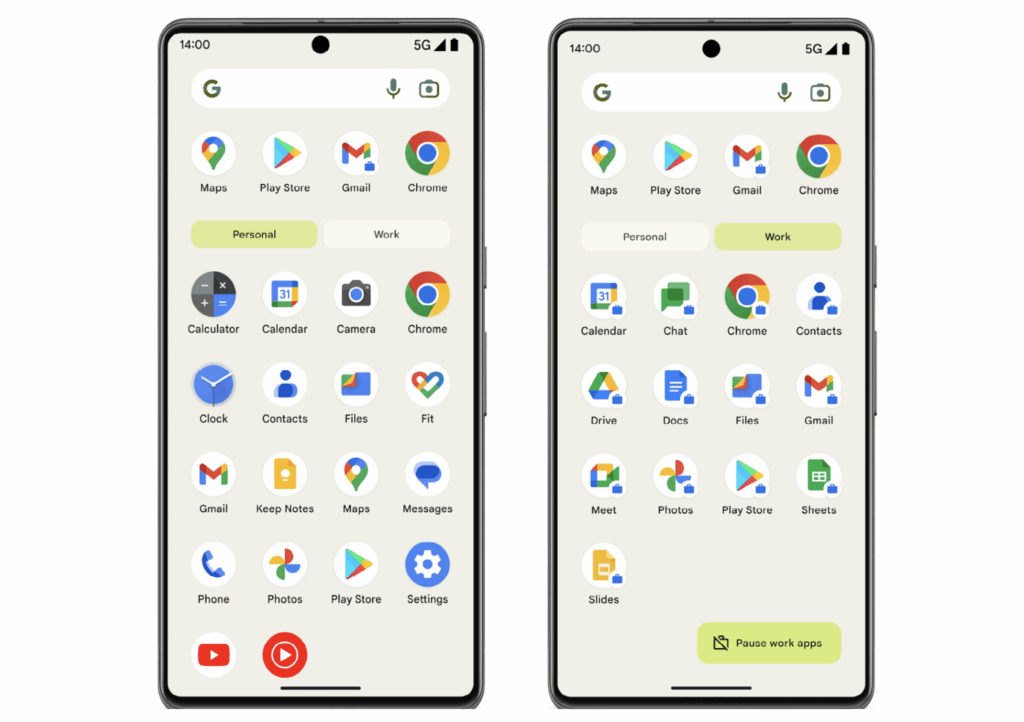
JumpCloud’s platform facilitates the implementation of a BYOD strategy without compromising security or privacy by establishing a clear separation between personal and work data. This separation empowers IT departments to manage and secure only work-related data on employee-owned devices. In the event of device compromise, loss, theft, or employee departure, IT can selectively remove work-related data, preserving personal information.
Effective IT security hinges on visibility and control over endpoints. To address this need, organizations often employ Mobile Device Management (MDM), Enterprise Mobility Management (EMM), or Unified Endpoint Management (UEM) solutions to manage BYOD programs. These solutions typically require employees to enroll their personal devices to access internal networks, email, calendars, VPNs, and other resources.
While prioritizing security and compliance, it is essential to respect employee privacy. Individuals are sensitive to the extent of their employer’s access to personal devices. Apple and Google have provided underlying frameworks to address these concerns, and JumpCloud’s unified platform for Identity, Access, and Device Management delivers solutions that balance security with privacy.
The Advantages of BYOD

Employees often prefer the convenience of using a single device for both personal and work purposes. This preference aligns with the BYOD model, which allows employees to leverage familiar technology for work tasks.
Organizations must prioritize the protection of all device endpoints to safeguard company applications and data, particularly in the face of escalating malware and phishing threats. BYOD programs, when implemented effectively, can provide a secure and efficient means of managing employee devices and protecting sensitive information.
Is BYOD a good idea?
Yes, BYOD can be an advantageous strategy to provide access to effective devices for your workforce. However, a codified BYOD program is essential for its success.
BYOD programs formalize and manage a practice that many employees already engage in: using personal devices for work purposes. By implementing processes for device enrollment and protection, organizations can safeguard their data and network security when accessed through personal mobile devices.
A well-designed BYOD program offers a mutually beneficial solution, protecting both corporate assets and individual privacy. By empowering employees to work efficiently using their preferred devices, organizations can enhance productivity and foster a more flexible work environment.
JumpCloud BYOD Management vs. Mobile Application Management (MAM)
While some organizations opt for Mobile Application Management (MAM) to implement BYOD programs, MAM is often perceived as a shortcut or a less comprehensive solution. Although MAM may offer a simpler approach for users to access content, it can also present limitations that may lead to negative experiences.
Limitations of Mobile Application Management (MAM)
Historically, Mobile Application Management (MAM) has been effective in managing work-related applications and separating devices into distinct work and personal partitions. However, MAM often falls short in key areas, such as Wi-Fi and email configuration, and automated app installation.
Additionally, MAM solutions may offer a limited selection of applications, and OS updates can sometimes disrupt MAM apps designed for specific platforms. Users may also encounter frustration when forced VPN access creates distinct interfaces for work and personal use. These limitations can hinder the overall effectiveness and user experience of MAM-based BYOD programs.
JumpCloud’s BYOD solution empowers administrators to:
-

Apply Corporate Configurations: Implement standardized settings for Wi-Fi, VPN, email, and passcode requirements.
-
Manage Applications: Install and remove necessary corporate apps and books.
-
Gather Device Information: Collect essential security data from personal mobile devices.
-
Enforce Security Policies: Add or remove restrictions to safeguard corporate data.

Benefits of BYOD Management
-
1
Formalization and management of what many employees are already doing: using their personal devices for work.
-
2
Data and network security protections for your organization even when employees access the network from their personal devices.
-
3
Iron-clad personal privacy protections for employees using JumpCloud BYOD on Android and Apple products.
Potential Risks Associated with BYOD
The improper implementation of BYOD programs can expose organizations to both external and internal security threats.
Organizational leaders may harbor negative perceptions regarding security and control within BYOD environments.
Insufficient staff education on privacy protections can foster distrust and reluctance among employees to enroll their devices.
BYOD Management Policy Best Practices
When developing a BYOD policy, it is essential to prioritize both organizational security and employee privacy. All aspects of the policy should align with these fundamental objectives.
Organizational Security
- Comprehensive Protection: Ensure that organizational data, access, and applications are comprehensively secured.
- Unified Platform: JumpCloud’s integrated platform offers a simplified and intuitive approach to managing access, devices, and identities, safeguarding the corporate side of personally-owned devices while maintaining ease of use for end users.
Employee Privacy is Paramount
- Respect for Personal Data: Recognize that employees’ personal devices often contain highly sensitive information, including photos, contacts, and personal details. Even the choice of apps can reveal private insights into hobbies, habits, and lifestyle.
- Limited Access: IT administrators are solely responsible for managing work information on personal devices and can demonstrate that they do not have access to personal information.
- Privacy Assurance: Reassure employees that their privacy is respected and protected. By dividing private mobile devices into separate volumes for work and personal use, IT administrators cannot view or erase private data, such as photos, personal mail, or contacts.
By adhering to these best practices and leveraging JumpCloud’s comprehensive solutions, organizations can establish effective BYOD policies that balance security and privacy, fostering trust and enabling efficient device management.
Implementing a Successful BYOD Policy
Historically, the delicate balance between privacy and security has hindered the successful implementation of BYOD programs. To overcome these challenges, organizations must reevaluate the role of Mobile Device Management (MDM) within the BYOD context.
JumpCloud offers a purpose-built solution that addresses both employee privacy concerns and stringent IT security requirements. By leveraging JumpCloud, organizations can establish a BYOD program that fosters trust and enables efficient device management.
Apple Devices
Account-Driven User Enrollment: This approach maintains a clear separation between personal and corporate data by associating personal data with a personal Apple ID and corporate data with a Managed Apple Account.
Android Devices
Work Profile: Setting up a Work Profile on Android devices enables the separation of work and personal data. This allows employees to securely use the same device for both work and personal purposes while ensuring that organizational data remains protected.
JumpCloud End-User Journey
-
Step 1: User Identity – Start with a JumpCloud cloud directory user identity.
-
Step 2: Onboarding – Streamlined end user driven device onboarding.
-
Step 3: Ongoing Management – Devices, Authentications, Applications, and Actions managed by JumpCloud.
-
Step 4: Offboarding – Effective and secure offboarding from all assets.
Boosting BYOD Program Enrollment with JumpCloud
By leveraging the combined capabilities of Apple, Google, and JumpCloud, organizations can significantly reduce device costs and streamline the device enrollment process. This collaborative approach delivers tangible benefits for both users and IT departments.
To effectively manage mobile devices, the following capabilities are essential:
- Mobile Device Management: Apple MDM and/or Android EMM
- Apple Business Manager or Apple School Manager: For Apple Devices
Additionally, the following features can substantially enhance your BYOD program:
- Single Sign-On Integration: Integrate JumpCloud with Google and Apple for seamless authentication.
- JumpCloud Protect: Enable biometric, passwordless authentication.
- JumpCloud Go: Provide secure access to protected resources.
- Conditional Access Policies: Enforce stringent security measures and access controls.
Apple iOS/iPadOS BYOD Configuration
Apple iOS devices initially require device management, encompassing enrollment, policy management, and application management. By implementing Mobile Device Trust, organizations can further enhance security by controlling access to Single Sign-On (SSO) applications through conditional access policies.
Google Android BYOD Configuration
JumpCloud Mobile Device Trust: Secure Access on the Go
JumpCloud Mobile Device Trust extends the capabilities of JumpCloud Go to mobile devices, providing seamless and secure access to JumpCloud-protected resources. By utilizing the JumpCloud Protect mobile app, users can register their devices with JumpCloud Go, enabling biometric, passwordless authentication for accessing protected resources.
When combined with Conditional Access Policies, JumpCloud Go for Mobile enforces Device Trust, ensuring that access to company resources is restricted to trusted devices. By leveraging JumpCloud Device Management, JumpCloud Go, JumpCloud Protect, and Conditional Access Policies (CAPs), organizations can safeguard access to both the JumpCloud User Portal and individual Single Sign-On (SSO) applications.
Mobile devices are considered trusted when they are enrolled in JumpCloud Device Management, have the JumpCloud Protect app deployed via Software Management, and are registered with JumpCloud Go. Upon registration, users verify their identity using JumpCloud Go for Mobile and biometric authentication on their device.
User Privacy Implications
For iOS/iPadOS
On iOS/iPadOS devices, personal information such as phone calls, SMS/iMessage, and web browsing history remains private and inaccessible to IT administrators. However, organizations may deploy applications to the device, which are considered company property and subject to restrictions and controls to prevent unauthorized data sharing. This keeps your private data where it belongs, and their private data where it belongs.
Key Privacy Considerations
- Data Separation: Personal and work data are kept separate, ensuring privacy for both the employee and the organization.
- Limited Administrator Access: IT administrators cannot access or view personal data within the employee’s personal profile.
IT Administrator Capabilities (iOS/iPadOS)
- Enforce Security Measures: Require a 6-digit PIN and prevent screenshots, copy-and-paste, and sharing between managed and unmanaged applications.
- Manage Device and Applications: Remove device management and assigned work applications.
For Android
On Android devices, personal information such as phone calls, SMS/MMS, and web browsing history remains private and inaccessible to IT administrators. However, organizations may deploy a separate container on the device to manage work-related data. This container is considered company property and is subject to restrictions and controls to prevent unauthorized data sharing.
Key Privacy Considerations
- Data Separation: Personal and work data are kept separate, ensuring privacy for both the employee and the organization.
- Limited Administrator Access: IT administrators cannot access or view personal data within the employee’s personal profile.
IT Administrator Capabilities (Android)
- Manage Work Profile Data: Remotely create, access, and delete data within the work profile.
- Enforce Security Measures: Implement minimum passcode requirements for the work profile and device, change the password for the managed account, and suspend access to the work profile.
- Control Data Sharing: Restrict data sharing between the work and personal profiles.
- Protect Sensitive Information: Block screen captures within the work profile.
- Manage Corporate Resources: Manage access to the organization’s corporate mail server and internal data.
- Deploy and Manage Applications: Remotely install and uninstall applications and certificates within the work profile.
- Configure App Settings: Manage permissions and other settings for applications within the work profile.
Limitations
Geographical Considerations
Please note that certain geographical regions may present limitations for JumpCloud’s BYOD solution. In some parts of Asia, such as Indonesia, Apple Business Manager may not be fully supported. This could impact the enrollment and management of Apple devices in these areas.
Additionally, Google Services, including Google Play, are restricted in mainland China due to government censorship. As JumpCloud’s Android EMM solution relies on Google’s Android Management APIs, Android devices cannot be enrolled and managed in China using our platform.
Organizations with a significant global presence should carefully consider these geographical limitations when evaluating JumpCloud’s suitability for their BYOD needs.
iOS/iPadOS 18 Limitation: Profile-Driven User Enrollment
With the release of iOS/iPadOS 18, Apple has discontinued support for Profile-Driven User Enrollment. Account-Driven User Enrollment is the preferred method for enrolling personal Apple devices running iOS/iPadOS 15 and later into JumpCloud’s Mobile Device Management (MDM). With this streamlined approach, end users can directly enroll their devices using a Managed Apple Account provided by your organization, eliminating the need for external profile downloads or QR code scans from the JumpCloud User Portal.
Please note that this change does not affect existing Profile-Driven Device Enrollments or Automated Device Enrollments.
Conclusion
Today organizations must empower employees to work from anywhere, on any device, to remain competitive and retain top talent. However, this flexibility must be balanced with robust security and privacy measures. An improperly implemented BYOD program can expose organizations to significant security threats, data breaches, and employee distrust.
JumpCloud offers a comprehensive solution that addresses these challenges head-on. By prioritizing security and privacy, JumpCloud enables organizations to create a BYOD program that is both effective and employee-friendly. With JumpCloud, you can confidently manage and secure work-related data on personal devices, enforce security policies, and protect employee privacy. JumpCloud provides the tools and framework to formalize and manage BYOD, mitigate risks, and boost employee satisfaction.
By leveraging JumpCloud’s unified platform for identity, access, and device management, you can confidently embrace the BYOD revolution, knowing that your organization is secure, your employees are productive, and their privacy is protected.
Protect Every Device You Can
Whether you own them or not, every device that touches organizational systems and data must be protected.
About JumpCloud
JumpCloud helps IT teams Make Work Happen by centralizing management of user identities and devices, enabling small and medium-sized enterprises to adopt Zero Trust security models. JumpCloud has been used by more than 200,000 organizations, including GoFundMe, Grab, Class Pass, Beyond Finance, and Foursquare. JumpCloud has raised over $400M from world-class investors including Sapphire Ventures, General Atlantic, Sands Capital, Atlassian, and CrowdStrike.